
Hand off a stock screen to valuation in four steps. Record the screen: criteria, universe, data source and run date. Reconcile each name: restate every filter it passed as a testable claim and rebuild that ratio from the 10-K or 10-Q. Triage: drop names that passed only on one-off items, period mismatches or definitional quirks, and log why. Open a case file for each confirmed name before any model is built.
What does a stock screening workflow hand to valuation?
A screen produces a list. Valuation needs something different: a small set of companies whose starting numbers are known to be right. The gap between the two is where most screening errors survive. The list says a company cleared a threshold on a vendor's field on a given day. It does not say whether the filed accounts support that result.
The hand-off described here therefore has one output per company, called a case file in this article. A case file is the folder or document an analyst opens before modeling begins. It holds the screen record that surfaced the name and the filter values the screen showed. It also holds the same ratios rebuilt from the filing, with the period and page, plus the unresolved questions. Nothing else reaches the model.
Treating the case file as the unit of output changes how the screen is judged. A screen that returns 40 names, of which 30 fail reconciliation, has not produced 40 candidates. It has produced ten case files and 30 entries in a rejection log. The ratio between the two numbers is information about the screen itself. A filter that keeps passing names on one-time gains needs a rewrite, not a bigger research budget.
The workflow also has a fixed boundary on the other side. The case file stops before any forecast, discount rate or value range is chosen. Those belong to the valuation model and the stock valuation report that documents it. The hand-off is narrower and earlier. Its only job is to make sure the model starts from filed facts and a stated reason the company is being studied at all.
That narrow scope is deliberate. Most screening guidance stops at the filter settings, and most valuation guidance starts at the model. The step between them is short to describe and easy to skip, which is why it gets its own procedure here.
Why is a screen result a hypothesis, not a finding?
Every number on a screen output passed through three layers before it reached the analyst. The company filed it. A data vendor mapped it into a standardized field. The screen then compared that field with a threshold at one moment. Each layer can shift the value without any change in the business.
The first layer is the filing. The SEC's financial statement data sets hold the numeric information from the face financials, extracted from XBRL in corporate filings. That is the as-filed record. A vendor field is a summary of it, built under the vendor's own rules for one-time items, leases and fiscal periods.
The second layer is the definition. Two screens can both say "debt to equity" and include different liabilities. Two can both say "trailing earnings" and assemble the twelve months from different quarters. The reasons fundamentals differ by source are mostly these definitional choices, and a threshold amplifies them. A company sitting near the line can pass under one vendor's definition and fail under another's.
The third layer is the threshold itself, which has side effects the screen does not display. A price-to-earnings filter cannot score a company with negative earnings, so those companies drop out silently. In Damodaran's January 2026 price-earnings dataset, 57.16 percent of 5,994 US firms were money-losing on a trailing basis. A low P/E screen never sees more than half of the firms in that dataset.
The same dataset shows how a single threshold samples industries unevenly. Its trailing P/E column reads 11.45 for homebuilding and 79.17 for system and application software. A cutoff of 12 sits near the first figure and far below the second. A single low P/E threshold run across every sector is therefore partly a sector screen.
None of this makes screening less useful. It means each screen result is a claim about vendor fields, to be tested against filings before it is treated as a fact about a company.
How do you record the screen so the result can be reproduced?
A screen that cannot be rerun cannot be audited. Six months later, the analyst will want to know why a name was studied. The answer should not depend on memory. The screen record is a short block, written at the moment of the run, that makes the result reproducible.
It contains six items:
- Criteria. Every filter with its exact threshold and direction, such as trailing P/E below 12.
- Definitions. The vendor's field name or formula for each ratio, including whether debt counts leases and how trailing earnings are assembled.
- Universe. Which listings the screen covered: exchange, country, size floor, sectors excluded.
- Data source and date. The provider, the run date and, where shown, the date of the latest fundamentals in the data.
- Result count. The number of names returned, before any review.
- Purpose. One sentence on what the screen was meant to find.
The date item matters more than it looks. A screen run in early March may combine prices from that day with annual figures released weeks earlier and quarterly figures from the prior autumn. The output mixes information dates. Recording them prevents a later reader from assuming every number was current on the run date.
The same point carries extra weight for historical screens. Banz and Breen (1986) documented that results built on accounting and market data depend on how the sample was assembled. Timing of data availability was one of the factors. A screen backtested on data that was not yet public at the test date reports a result no investor could have obtained. The survivorship bias in stock screens is the related problem on the exit side: companies that later disappeared are missing from today's history.
The purpose sentence is the item most often left out. Without it, a reviewer cannot tell a deliberate deep-value screen from a quality screen that happened to return cheap names. It also anchors the rejection log. A name rejected for high leverage means something different under a balance-sheet screen than under a pure valuation screen.
How do you check why each name passed the screen?
The reconciliation step takes each surviving name and asks one question per filter: does the filing support the value that cleared the threshold? The method is mechanical. Restate the filter as a testable claim. Rebuild the ratio from the latest 10-K or 10-Q on SEC EDGAR, using the same period the screen used. Then set the screen value, the rebuilt value and the threshold side by side.
An illustrative company shows the procedure. The screen asks for trailing P/E below 12, return on equity above 15 percent and debt to equity below 0.5. Company A appears at a price of $48.00, with trailing earnings per share of $5.00, so the screen shows a P/E of 9.6. Net income was $500 million on 100 million shares. Average equity was $2,000 million, so ROE shows as 25.0 percent. Total debt of $700 million gives debt to equity of 0.35.
The 10-K changes the first filter. Net income includes a $140 million after-tax gain on the sale of a business unit. Recurring net income is $360 million, or $3.60 per share. At $48.00, that is a P/E of 13.3, above the threshold of 12. On the same recurring basis, ROE is 18.0 percent, which still clears 15 percent.
The third filter depends on a definition. The vendor's debt field excludes $400 million of operating lease liabilities shown on the balance sheet. Including them, debt to equity is $1,100 million over $2,000 million, or 0.55. The company passes under the vendor definition and fails under a lease-inclusive one. Neither answer is wrong. The screen record should state which definition the strategy intends.
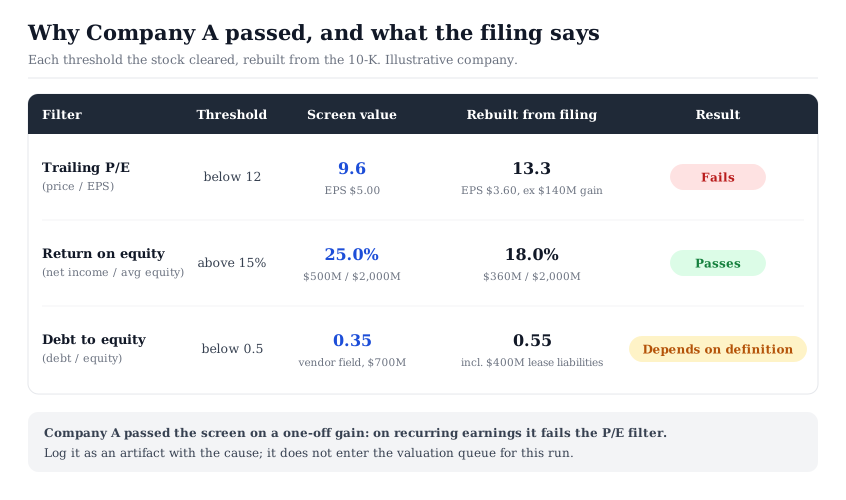
Company A passed the screen because of a one-time gain. On recurring earnings it fails the primary filter, so it leaves the queue for this run. It goes into the rejection log with the item that caused the gap. That entry costs a few minutes and prevents a full valuation of a company the screen was never meant to surface.
Six data artifacts that let a stock pass a screen
Company A shows the most common artifact. The broader pattern is that a ratio can cross a threshold for reasons unrelated to the business the screen was meant to find. Six sources account for most such cases.
One-time items. Gains on asset sales, litigation settlements, tax benefits and impairment reversals lift trailing earnings for one year. They depress P/E and raise ROE without any change in recurring profitability. The income statement and the notes name them. The patterns that recur across companies are catalogued in earnings quality red flags.
Period mismatches. A trailing figure assembled from four quarters can straddle an acquisition, a restatement or a change in fiscal year-end. Price is current while earnings may be months old. How these windows are built, and why two sources disagree, is set out in TTM versus fiscal-year data.
Small or negative denominators. A company with equity near zero, or negative after years of buybacks, can show an extreme ROE or price-to-book ratio. The number is arithmetically right and analytically empty. Check the denominator before reading any ratio that clears a threshold by a wide margin.
Share count changes. Earnings per share computed on an outdated share count overstates or understates per-share figures after large issuance or buybacks. Rebuild per-share values with the diluted count from the latest filing.
Definitional choices. Leases in or out of debt, minority interests in or out of equity, and adjusted or reported earnings all move ratios. These are not errors. They become errors only when the strategy and the vendor assume different definitions.
Sector-inappropriate metrics. Some ratios carry little meaning for some business models. Leverage screens misread banks, where deposits are the raw material of the business rather than financing debt. A bank that passes or fails a leverage filter has told the analyst very little.
A hit flagged under any of these headings goes to the rejection log, with the cause written next to it. A near miss is a name whose result depends on a definition the screen record has not fixed. It stays in the log until that definition is settled, and it gets a case file only once it is confirmed, as Figure 2 shows.
What goes into a valuation case file before modeling starts?
A case file is opened only for names that pass reconciliation. Its job is to give the valuation step everything it needs to start, and nothing that belongs to the model itself. Eight items cover it:
- The screen record reference. Which run surfaced the name, so the reason it is being studied stays traceable.
- The reconciliation table. Screen value, rebuilt value and threshold for every filter, as in Figure 1.
- Base-year figures with sources. Revenue, operating income, net income, cash flow from operations, capital spending, debt and diluted shares, each with filing, period and page.
- Adjustments made. Every one-time item removed or definition changed, with the reason.
- Method fit. A note on which valuation approaches suit the business and which do not. A stable industrial may suit a cash-flow model; a bank needs an equity-side method.
- Reference points. Any valuation figures already published for the company, recorded as dated reference points to compare against, never as inputs.
- Open questions. What the filings did not answer, each with the document that might.
- Stop conditions. Facts that would end the work early, such as a pending restatement or a going-concern note.
Items 3 and 8 do the most work. Verified base-year figures remove the most common source of a wrong valuation: a correct model fed a wrong starting number. Stop conditions save the most time, because they are checked before any forecast is built.
On an InvestViable stock page, the reference points take a fixed form. Each page shows three base valuations: DCF, EBITDA Multiple and Earnings Fair Value. Record all three with their date. Do not average them; the spread between methods is itself information the model will need to explain.
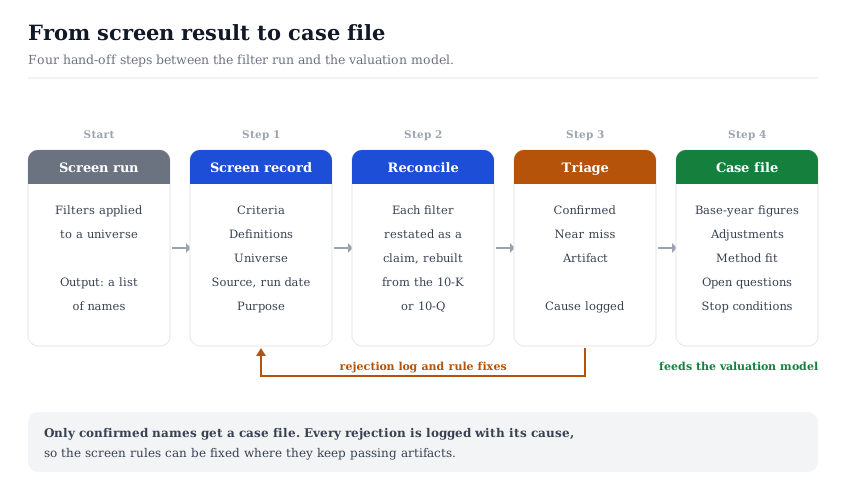
The case file then passes to the model. The InvestViable Valuator runs a discounted cash flow from inputs the analyst sets: the cash flow growth path, the discount rate and the terminal growth rate. A growth path is only as reliable as the cash flow it starts from, which is why item 3 comes first.
Where the hand-off sits in the wider workflow
The hand-off occupies a narrow position between two well-covered stages, and its boundaries are worth naming. The shares screener workflow covers how to build the filter funnel itself: data standards, consistent metrics and the order of filters. The three value-investing strategy recipes cover which filter sets suit which market conditions. This article starts where both end, with a list already in hand.
Downstream, the case file feeds the stages that turn a valuation into a decision. The five-step valuation workflow places screening, scoring, valuing, documenting and deciding in sequence. The case file is the concrete input its valuing stage receives. After the model runs, the due diligence process from checklist to decision covers how findings become a verdict.
The rejection log is what turns the hand-off into a loop. Each run adds entries: the name, the filter it passed, the cause of the gap. After a few runs, patterns appear. A low P/E filter that keeps returning companies with one-time gains needs a recurring-earnings definition. A leverage filter that keeps catching banks needs a sector exclusion. The screen improves because its failures were written down.
On the tool side, the InvestViable stock screener applies rule-based filters to 3,000+ US stocks on fundamentals and the Investment Score. It compares price against fair value alongside the Score. Its fundamentals come from a financial data provider, Financial Modeling Prep. Every hit it returns is therefore a vendor-field hypothesis to reconcile against the filing, like any other screen. The low P/E slice of the Stock Universe is a ready-made starting list that needs the same checks.
The safety checklist for avoiding value traps applies once a name holds a case file. Its cash, solvency and accounting checks read best against figures already rebuilt from the filing.
InvestViable does not publish buy or sell recommendations on individual securities. All analysis is based on public financial data and a transparent methodology. The Investment Score formula is proprietary; the inputs and what the score evaluates are documented.